You keep ticking tasks.
Are you any closer
to the life you want?
Most planners record what you did. Sirius Focus asks whether it worked and keeps the record you need to answer. When you get stuck, you can see why.
For people who are busy all day and can't tell if it's working.
Start with an inbox and a calendar. Add the rest if you want it. Free during the beta, in your browser and on your phone.
The problem
Being busy and getting somewhere feel identical from the inside
Both fill the week. Both end in a column of ticks. Only one of them shows up in your life a year later, and nothing you use will tell you which one you just had.
You said yes again
The list grew. Nothing came off it. Everything on there had a good reason for being added, so nothing ever leaves.
The one that mattered slid
There was a good excuse every time. It's still on the list, and it has been for a while.
And you can't prove which was which
A finished list looks the same either way. Nothing keeps a record of what you skipped, so by Sunday all you have is a feeling.
What action would prove I'm actually moving this forward?
Sirius Focus asks that everywhere.
Direction
The same task, with and without a reason to exist
On its own, a task is something you once agreed to:
Call John
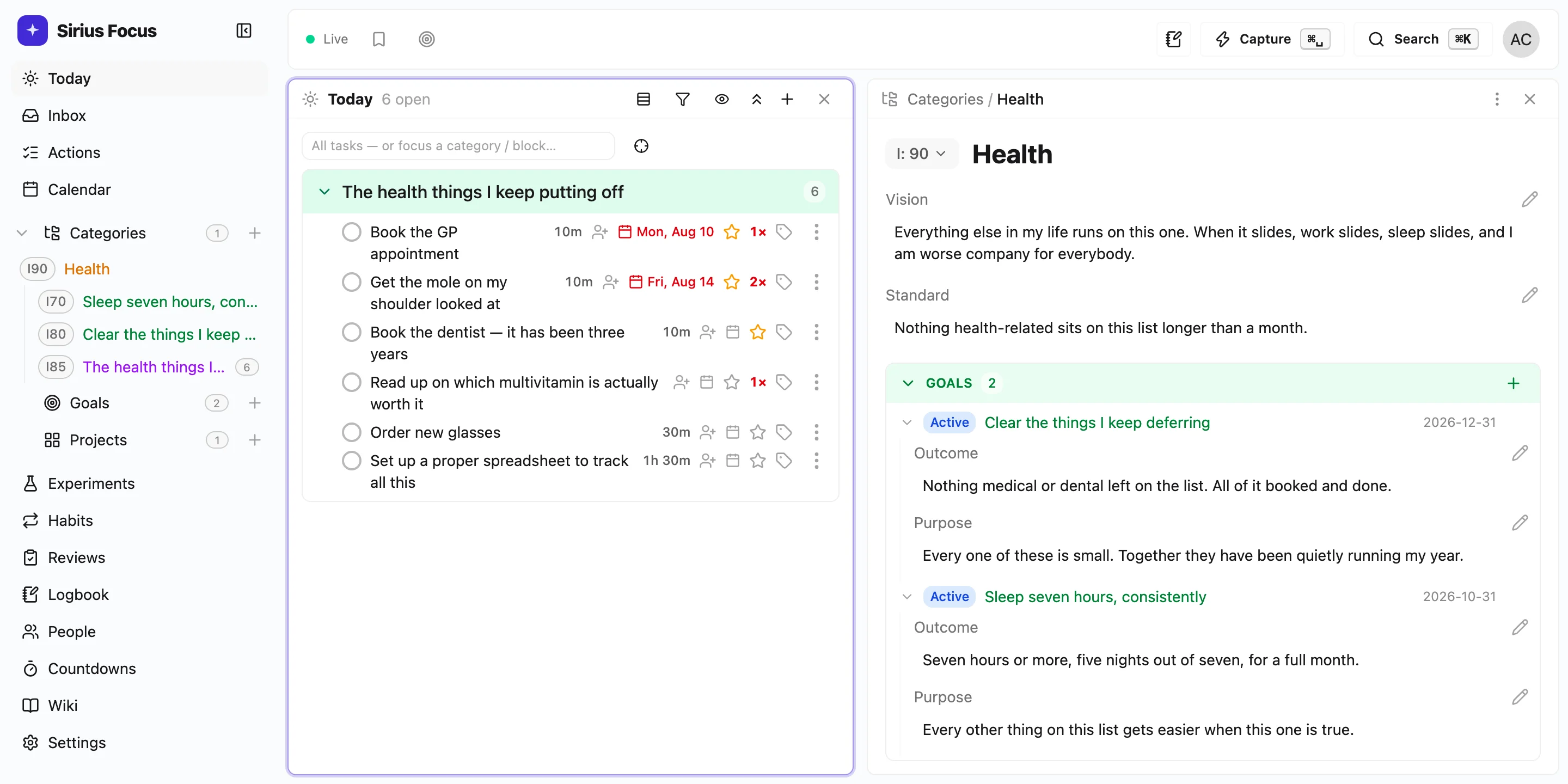
Under the outcome it belongs to, you can tell whether to do it:
- Business
- the area
- Vision
- a business that doesn't need me in the room
- Goal
- ten new customers by March
- Project
- customer acquisition
- Objective
- twenty conversations with people who already have the problem
- Purpose
- guessing at the pitch has cost me two quarters
- Action
- call John
Same task. Now you can tell whether it's worth your Tuesday.
Areas are the parts of your life that never finish. Group projects under them once you have a few, and you can see which areas you've stopped giving time to.
None of this is required. An action can sit in the inbox indefinitely and never belong to anything.
Reality
Your list says what you could do. Your week says what there's room for.
A task list can be any length. A week can't. Put projects, areas and goals on the calendar and you plan against the time you actually have.
It also settles arguments with yourself. If the goal that matters most got ninety minutes this week and another one got eleven hours, you can see it on the calendar, in colour.
A backlog isn't a plan for today. Pull across the few you've picked up and let the rest wait out of sight.
⌘K opens anything, and every list works without the mouse. If a system is slow to use, you stop using it.
Evidence
One skip is a reason. Nine is a pattern.
Everything here gets written down as you go, in seconds. Skip something and you say why, in one line. Tag what happened in the logbook: learned, worked, failed. Miss a habit and you can say what got in the way, or freeze the day if you couldn't help it.
On its own, every reason is a good one. You were tired. The day went sideways. It wasn't the right week. Nine of them against the same task, in your own words, is something else.
It never tells you you're avoiding something. It shows you that you moved the same task four times and wrote "don't know where to start" every time.
You say the rest. Sometimes the task matters more than everything else on your list. Sometimes it should never have been on it. The app doesn't decide which. It just makes sure you see the record.
Everything above is the real app, running in this page. Sign up with an email and it's yours.
Create your accountReviews
The week gets a verdict, and it comes from you
Morning, evening and weekly, with real questions instead of a blank page. You don't start from nothing: what you finished, what slid, what you skipped and the reasons you gave, which habits held. It's all there because you wrote it down when it happened, not on a Sunday night from memory. There's a section on what to stop doing, which is the one most people skip. The app asks, you answer, then you change something and next week shows whether it worked.
The point
From a full week to a decided one
Before
You end the week tired. You were busy, and you're not sure it mattered. The thing you care about hasn't moved in a month and you can't say why, because none of it was written down.
After
You end the week knowing what moved and what didn't, what you wrote down the four times you avoided the one that counts, and what you'll do about it.
That isn't about getting more done. It's about choosing what you do.
Start small
Use as much of it as you need
You don't have to set any of this up first. Capture into the inbox, put the week in the calendar, and that's already a working system. Add a layer when you need one, and drop it when you don't. Anything you ignore stays out of the way.
- Inbox
- From day one. For anything you don't want to keep in your head.
- Calendar
- From day one. What the week has room for, rather than what you hoped.
- Projects
- When a handful of tasks turn out to share one outcome.
- Categories
- When you have enough projects to want them grouped by area of life. Grouping is the point. The purpose and standard fields are there if you want them, and empty if you don't.
- Goals
- When a project turns out to have been three projects.
- Habits
- When something needs to keep happening rather than get finished.
- Logbook and scratchpad
- When you want a record of the day rather than a column of ticks.
- Reviews
- When you want the week to tell you something instead of just ending.
Honesty
Who this isn't for
-
✗
You already know exactly what matters and execute on it cleanly. This solves a problem you don't have.
-
✗
You want a shared board for a team. This is built for one person being honest with themselves.
-
✗
You want an app that will figure you out. This one hands you the evidence and expects you to do the thinking.
Standing on good ideas
- Atomic Habits, by James Clear
- Never miss twice. Freeze days and misses-with-reasons come from it.
- Getting Things Done, by David Allen
- Capture everything, triage to zero, review weekly.
- PARA and Building a Second Brain, by Tiago Forte
- Areas versus projects.
- The 80/20 Principle, by Richard Koch
- The vital few. It's why you star a few items instead of ranking all of them.
- OmniFocus
- Flexible perspectives and a keyboard-first workspace.
Sirius Focus is not affiliated with or endorsed by any of these. It borrows the ideas and says where they came from.
Offline
Your machine first
The whole workspace lives on your device. Opening it doesn't wait on a server, and neither does anything you type.
Edits wait for the network
Plan on a plane. Every edit is saved and sent when you're back online, in the order you made them.
On your phone too
Add it to your home screen and it opens like an app, offline included, so you can capture wherever the thought happens. Native iOS and Android apps are on the way. Every device stays in sync.
Pricing
Free if you join the beta
Sign up during the beta and keep the full app for free. If a new feature costs us a lot to run, we might introduce a price for it that just covers our costs, without profit.
Then answer one question: what would prove you're actually moving?